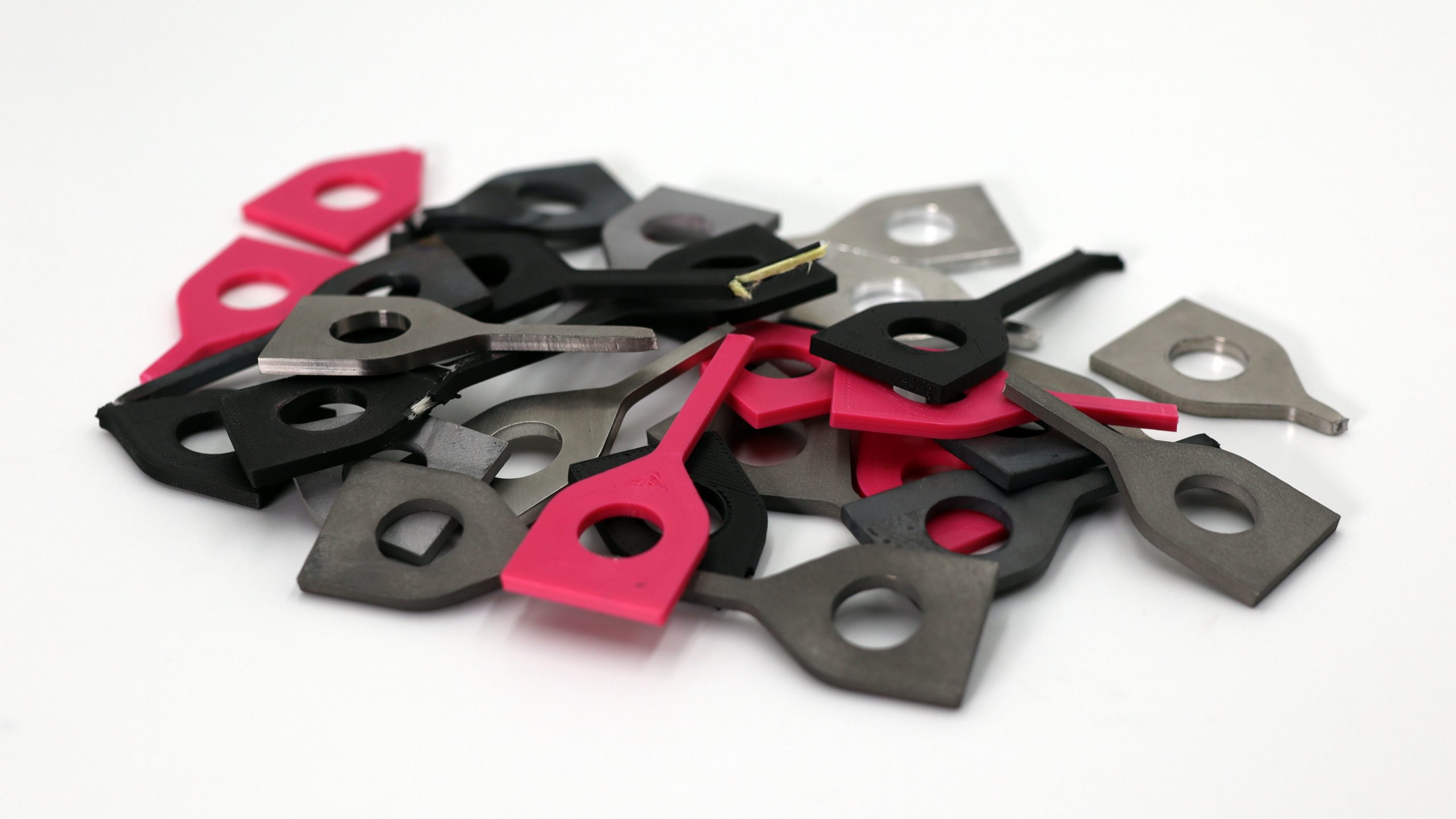
A while back I forayed into bench testing the strength of 3D printed parts. The idea at the time was to test the strength of a particular design printed in different materials. It was well received on YouTube and I received a lot of comments and advice on how to do it better next time around. This time around I designed a simple one piece test specimen to eliminate some of the inaccuracies of the last design and provide consistent results between materials/processes. I again have PCBWay on board who were kind enough to provide me with a swag of exotic 3D printed and CNC machined metal parts.

I used the same one tonne test rig that I built for the previous video. But this time I added some electronics to it to allow me to log the data to an SD card and collect data ten times a second. This data resolution was much better than last time.

I tested about 15 specimens, including some 3D printed plastic. What did I learn? Well, first of all, PLA can be pretty strong with the right print settings. 100% infill and maximum walls were comparable and far stronger than the part with 15% infill. Markforged Nylon FR with continuous filament was about twice as strong as PLA. The real surprise though was just how strong the Sintered Laser Melting (SLM) 3D printed metal was. All of the four different metals tested were stronger than their CNC machined counterparts.

It’s also worth mentioning the high plasticity of some of the metals. The CNC machined 316 stainless steel stretched 16.5% of its length before finally fracturing. This was fun to watch!
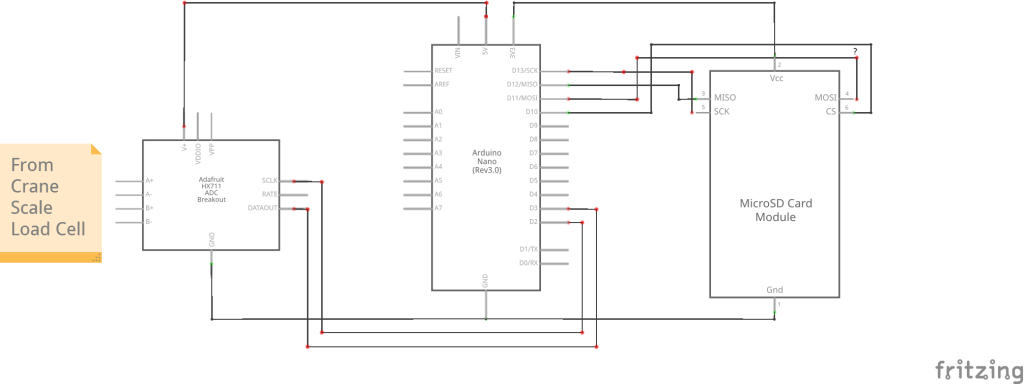
2026 edit: I modified a Vevor crane scale to provide an accurate and cheapish logging unit for this project. I used an Arduino Nano Every, Makerverse SD card module and an HX711 ADC breakout. The schematic and code is below.
#include <SdFat.h>
#include "HX711.h"
#include <SPI.h>

#define calibration_factor -5450 //This value is obtained using the SparkFun_HX711_Calibration sketch

#define LOADCELL_DOUT_PIN  3
#define LOADCELL_SCK_PIN  2
#define SD_CS_PIN 10

HX711 scale;
SdFat SD;
File dataFile;

void setup() {
  Serial.begin(9600);
  while (!Serial) {}
  Serial.println("HX711 scale demo");

  scale.begin(LOADCELL_DOUT_PIN, LOADCELL_SCK_PIN);
  scale.set_scale(calibration_factor);
  scale.tare();

  if (!SD.begin(10)) {
    Serial.println("SD card initialization failed");
    return;
  }
  Serial.println("SD card initialization done.");

  dataFile = SD.open("datalog.txt", FILE_WRITE);
  if (!dataFile) {
    Serial.println("Error opening file");
  }
}

void loop() {
  // Read the weight from the load cell
  float weight = scale.get_units();
  unsigned long currentTime = millis();

File dataFile = SD.open("datalog.txt", FILE_WRITE);

  // Log the weight to the SD card
  dataFile.print(currentTime);
  dataFile.print(",");
  dataFile.println(weight);
  dataFile.close();
  // Print the weight to the serial monitor
  Serial.print("");
  if (isnan(weight)) {
    Serial.println("ERROR");
  } else {
    Serial.print(weight);
    Serial.println("");
  }

  // Wait for a second before taking the next reading
  delay(25);
}